
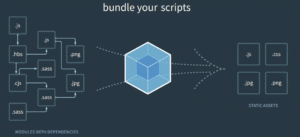
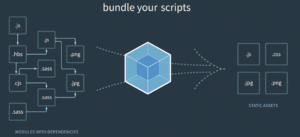
What is Webpack?
Core Concepts
-
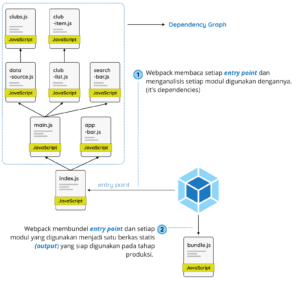
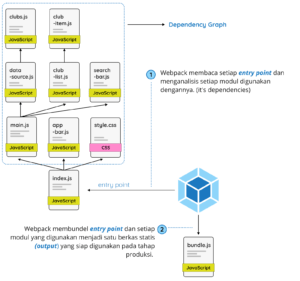
- Entry : Titik awal di mana webpack akan menganalisa berkas dan membentuk dependency graph.
-
- Output : Berkas bundel yang dihasilkan dari berkas-berkas yang dianalisis webpack berdasarkan entry point.
- Loaders : Transformation tools pada webpack, yang akan memproses setiap berkas selain JavaScript atau JSON yang kita impor jadi format yang bisa dipakai ke tahap produksi.
-
- Plugin : Dipakai untuk melakukan tugas seperti optimasi bundel, management aset dan lain-lain.
-
- Mode : Keadaan yang dipakai webpack sebagai acuan optimasi apa saja yang perlu diterapkan dalam melakukan tugasnya. Dalam mode kita bisa menetapkan nilai production, development maupun none
Entry
-
- module.exports = {
-
- entry: ‘./path/to/my/entry/file.js’
- };
-
- module.exports = {
-
- entry: {
-
- main: ‘./path/to/my/entry/file.js’
-
-
- }
- };
-
-
- module.exports = {
-
- entry: {
-
- app: ‘./src/app.js’,
-
- adminApp: ‘./src/adminApp.js’
-
-
- }
- }
-
Output
-
- const path = require(‘path’);
-
- module.exports = {
-
- entry: ‘./path/to/my/entry/file.js’,
-
- output: {
-
- path: path.resolve(__dirname, ‘dist’),
-
- filename: ‘my-first-webpack.bundle.js’
-
-
- }
- };
-
-
- module.exports = {
-
- entry: {
-
- app: ‘./src/app.js’,
-
- search: ‘./src/search.js’
-
- },
-
- output: {
-
- filename: ‘[name].js’,
-
- path: __dirname + ‘/dist’
- }
- };
-
// webpack akan menghasilkan:./dist/app.js,./dist/search.js
-
Loaders
- Properti test merupakan tipe berkas yang akan ditransformasikan.
- Properti use merupakan loader mana yang akan dipakai untuk mentransformasikan berkas itu.
-
- module.exports = {
-
- module: {
-
- rules: [
-
- { test: /.css$/, use: ‘css-loader’ }
-
- ]
-
-
- }
- };
-
- npm install css–loader —save–dev
-
- module.exports = {
-
- module: {
-
- rules: [
-
- {
-
- test: /.css$/,
-
- use: [
-
- {
-
- loader: “style-loader”
-
- },
-
- {
-
- loader: “css-loader”
-
- }
-
- ]
-
- }
-
- ]
-
-
- }
- }
-
-
- module.exports = {
-
- module: {
-
- rules: [
-
- {
-
- test: /.css$/,
-
- use: [
-
- {
-
- loader: “style-loader”,
-
- options: {
-
- // memasukkan style dengan tag <style> di bawah dari element <body>
-
- insert: “body”
-
- }
-
- },
-
- {
-
- loader: “css-loader”
-
- }
-
- ]
-
- }
-
- ]
-
-
- }
- }
-
Plugin
- ConsoleLogOnBuildWebpackPlugin.js
-
- const pluginName = ‘ConsoleLogOnBuildWebpackPlugin’;
-
- class ConsoleLogOnBuildWebpackPlugin {
-
- constructor(options) {
-
- this.options = options;
-
- }
-
- apply(compiler) {
-
- compiler.hooks.run.tap(pluginName, compilation => {
-
- console.log(this.options.message);
-
- });
-
- }
-
- }
-
- module.exports = ConsoleLogOnBuildWebpackPlugin;
-
-
- const ConsoleLogOnBuildWebpackPlugin = require(“./console-log-on-build-webpack-plugin.js”);
-
- module.exports = {
-
- plugins: [
-
- new ConsoleLogOnBuildWebpackPlugin({
-
- message: “The webpack build process is starting!”
-
- })
-
-
- ]
- }
-
-
- const webpack = require(“webpack”); // diperlukan untuk mengakses built-in plugins
-
- module.exports = {
-
- plugins: [
-
- new webpack.ProgressPlugin()
-
-
- ]
- }
-
- npm install html–webpack–plugin —save–dev
-
- const HtmlWebpackPlugin = require(‘html-webpack-plugin’); //dipasang via npm
-
- module.exports = {
-
- plugins: [
-
- new HtmlWebpackPlugin({
-
- template: “./src/index.html”,
-
- filename: “index.html”
-
- })
-
-
- ]
- };
-
Mode
-
- module.exports = {
-
-
- mode: ‘production’
- };
-
- webpack —mode development
-
- module.export = {
-
- mode: ‘development’,
-
-
- devtool: ‘eval’,
- cache: ‘true’}
-
-
- const config = {
-
- entry: ‘./app.js’
-
- //…
-
- };
-
- module.exports = (env, argv) => {
-
- if (argv.mode === ‘development’) {
-
- config.devtool = ‘source-map’;
-
- }
-
- if (argv.mode === ‘production’) {
-
- //…
-
- }
-
- return config;
- };
-
- “scripts”: {
-
- “build:prod”: “webpack –config webpack.prod.js”,
-
-
- “build:dev”: “webpack –config webpack.dev.js”,\
- }
-
Using Webpack
Installing Webpack
-
-
- npm install webpack —save–dev
- npm install webpack–cli —save–dev
-
- npm install webpack webpack–cli —save–dev
-
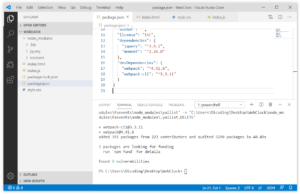
- “scripts”: {
-
- “test”: “echo “Error: no test specified” && exit 1″,
-
- “start”: “http-server.”,
-
-
- “build”: “webpack”
- },
-
-
- {
-
- “name”: “webclock”,
-
- “version”: “1.0.0”,
-
- “description”: “”,
-
- “main”: “index.js”,
-
- “scripts”: {
-
- “build”: “webpack”
-
- },
-
- “author”: “”,
-
- “license”: “ISC”,
-
- “dependencies”: {
-
- “jquery”: “^3.4.1”,
-
- “moment”: “^2.24.0”
-
- },
-
- “devDependencies”: {
-
- “webpack”: “^4.41.6”,
-
- “webpack-cli”: “^3.3.11”
-
-
- }
- }
-
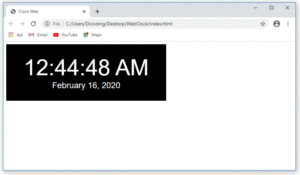
- npm run build
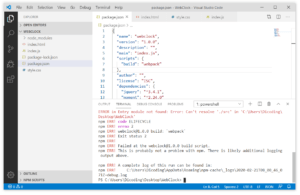
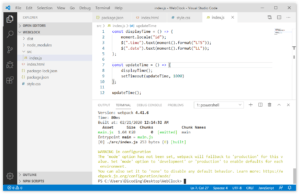
- ERROR in Entry module not found: Error: Can‘t resolve ‘./src‘ in ‘C:UsersDicodingDesktopWebClock‘
-
- import $ from “jquery”;
-
- import moment from “moment”;
-
- const displayTime = () => {
-
- moment.locale(“id”);
-
- $(“.time”).text(moment().format(“LTS”));
-
- $(“.date”).text(moment().format(“LL”));
-
- };
-
- const updateTime = () => {
-
- displayTime();
-
- setTimeout(updateTime, 1000)
-
- };
-
- updateTime();
-
- <!DOCTYPE html>
-
- <html>
-
- <head>
-
- <title>Clock Web</title>
-
- <link rel=“stylesheet” href=“style.css”>
-
- </head>
-
- <body>
-
- <div class=“clock”>
-
- <span class=“time”></span>
-
- <span class=“date”></span>
-
- </div>
-
- <script src=“./dist/main.js”></script>
-
-
- </body>
- </html>
-
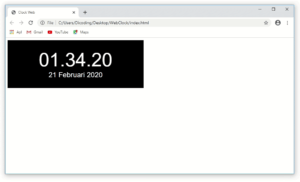
- npm run build
Creating configuration files
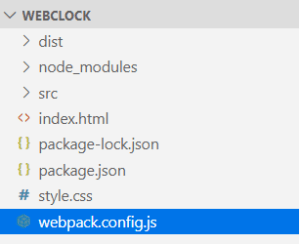
-
- const path = require(“path”);
-
- module.exports = {
-
- entry: “./src/index.js”,
-
- output: {
-
- path: path.resolve(__dirname, “dist”),
-
- filename: “bundle.js”
-
-
- }
- }
-
- npm run build
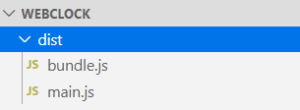
-
- <!DOCTYPE html>
-
- <html>
-
- <head>
-
- <title>Clock Web</title>
-
- <link rel=“stylesheet” href=“style.css”>
-
- </head>
-
- <body>
-
- <div class=“clock”>
-
- <span class=“time”></span>
-
- <span class=“date”></span>
-
- </div>
-
- <script src=“./dist/bundle.js”></script>
-
-
- </body>
- </html>
-
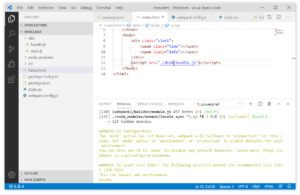
-
- const path = require(“path”);
-
- module.exports = {
-
- entry: “./src/index.js”,
-
- output: {
-
- path: path.resolve(__dirname, “dist”),
-
- filename: “bundle.js”
-
- },
-
-
- mode: “production”
- }
-
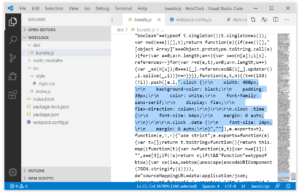
“Sebetulnya kita juga bisa melihat warning lain yang menunjukkan ukuran bundle.js telah melampaui batas. Kita dapat lihat sendiri dengan membuka berkas bundle.js. Di sana kita akan mendapatkan banyak sekali kode yang dihasilkan dibandingkan dengan sebelumnya.Hal ini dikarenakan kode yang kita tulis mempunyai ketergantungan (dependencies) terhadap package JQuery dan Moment. Sehingga package itu perlu dibundel pula pada berkas bundle.js. sebab itulah berkas bundle.js jadi bengkak ukurannya.Ini adalah salah satu alasan kenapa disarankan kita hindari pemakaian package pihak ke-3 yang kita bawa sampai tingkat production. Membengkaknya berkas bundle.js, pasti akan berakibat terhadap kinerja web yang kita bangun nantinya.”
Using Loader
Style and CSS Loader
- npm install style–loader css–loader —save–dev
-
- const path = require(“path”);
-
- module.exports = {
-
- entry: “./src/index.js”,
-
- output: {
-
- path: path.resolve(__dirname, “dist”),
-
- filename: “bundle.js”
-
- },
-
- mode: “production”,
-
- module: {
-
- rules: [
-
- {
-
- test: /.css$/,
-
- use: [
-
- {
-
- loader: “style-loader”
-
- },
-
- {
-
- loader: “css-loader”
-
- }
-
- ]
-
- }
-
- ]
-
-
- }
- }
-
- import “./style/style.css”;
-
-
- import moment from “moment”;
- const displayTime = () => {
- moment.locale(“id”);
-
-
- $(“.time”).text(moment().format(“LTS”));
-
- $(“.date”).text(moment().format(“LL”));
-
-
- };
-
-
-
-
- const updateTime = () => {
- displayTime()
- const updateTime = () =>
setTimeout(updateTime, 1000)
-
-
-
-
- };
- updateTime();
-
- <link rel=“stylesheet” href=“style.css”>
-
- <!DOCTYPE html>
-
- <html>
-
- <head>
-
- <title>Clock Web</title>
-
- </head>
-
- <body>
-
- <div class=“clock”>
-
- <span class=“time”></span>
-
- <span class=“date”></span>
-
- </div>
-
- <script src=“./dist/bundle.js”></script>
-
-
- </body>
- </html>
-
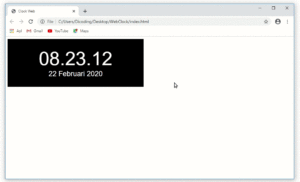
Babel Loader

- npm install @babel/core babel–loader @babel/preset–env —save–dev
-
- {
-
- “name”: “webclock”,
-
- “version”: “1.0.0”,
-
- “description”: “”,
-
- “main”: “index.js”,
-
- “scripts”: {
-
- “build”: “webpack”
-
- },
-
- “author”: “”,
-
- “license”: “ISC”,
-
- “dependencies”: {
-
- “jquery”: “^3.4.1”,
-
- “moment”: “^2.24.0”
-
- },
-
- “devDependencies”: {
-
- “@babel/core”: “^7.8.4”,
-
- “@babel/preset-env”: “^7.8.4”,
-
- “babel-loader”: “^8.0.6”,
-
- “css-loader”: “^3.4.2”,
-
- “style-loader”: “^1.1.3”,
-
- “webpack”: “^4.41.6”,
-
- “webpack-cli”: “^3.3.11”
-
-
- }
- }
-
-
- const path = require(“path”);
-
- module.exports = {
-
- entry: “./src/index.js”,
-
- output: {
-
- path: path.resolve(__dirname, “dist”),
-
- filename: “bundle.js”
-
- },
-
- mode: “production”,
-
- module: {
-
- rules: [
-
- /* style and css loader */
-
- {
-
- test: /.css$/,
-
- use: [
-
- {
-
- loader: “style-loader”
-
- },
-
- {
-
- loader: “css-loader”
-
- }
-
- ]
-
- },
-
- /* babel loader */
-
- {
-
- test: /.js$/,
-
- exclude: “/node_modules/”,
-
- use: [
-
- {
-
- loader: “babel-loader”,
-
- options: {
-
- presets: [“@babel/preset-env”]
-
- }
-
- }
-
- ]
-
- }
-
- ]
-
-
- }
- }
-

Webpack Dev Server
- npm install webpack–dev–server —save–dev
-
- “scripts”: {
-
- “build”: “webpack”,
-
-
- “start-dev”: “webpack-dev-server”
- }
-
- npm run start–dev
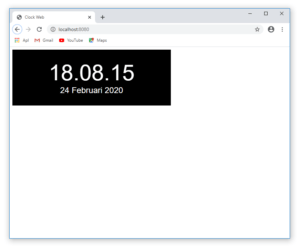
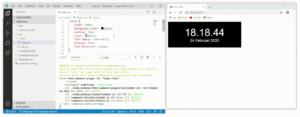
Untuk menghentikan service webpack-dev-server, pakai perpaduan ctrl + c pada terminal yang dipakai. Ingatlahbahwa disarankan kita hentikan service webpack-dev-server tiap kali mau melakukan perubahan pada berkas webpack configuration.
Configuration Environment
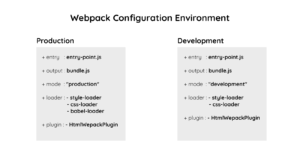
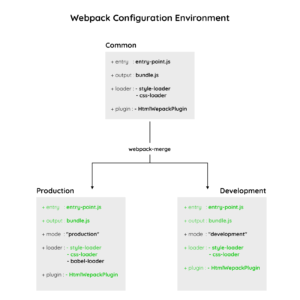
Using webpack-merge
- npm install webpack–merge —save–dev
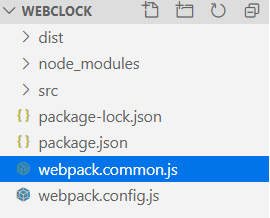
-
- const path = require(“path”);
-
- const HtmlWebpackPlugin = require(“html-webpack-plugin”);
-
- module.exports = {
-
- entry: “./src/index.js”,
-
- output: {
-
- path: path.resolve(__dirname, “dist”),
-
- filename: “bundle.js”
-
- },
-
- module: {
-
- rules: [
-
- /* style and css loader */
-
- {
-
- test: /.css$/,
-
- use: [
-
- {
-
- loader: “style-loader”
-
- },
-
- {
-
- loader: “css-loader”
-
- }
-
- ]
-
- }
-
- ]
-
- },
-
- /* plugin */
-
- plugins: [
-
- /* HTML Webpack Plugin */
-
- new HtmlWebpackPlugin({
-
- template: “./src/template.html”,
-
- filename: “index.html”
-
- })
-
-
- ]
- }
-
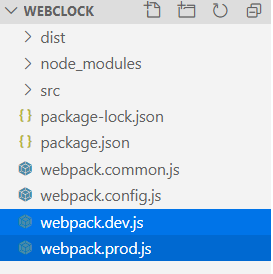
-
- webpack.prod.js
-
- const merge = require(“webpack-merge”);
-
- const common = require(“./webpack.common.js”);
-
- module.exports = merge(common, {
-
- mode: “production”,
-
- module: {
-
- rules: [
-
- /* babel loader */
-
- {
-
- test: /.js$/,
-
- exclude: “/node_modules/”,
-
- use: [
-
- {
-
- loader: “babel-loader”,
-
- options: {
-
- presets: [“@babel/preset-env”]
-
- }
-
- }
-
- ]
-
- }
-
- ]
-
-
- }
- })
-
- webpack.dev.js
-
- const merge = require(“webpack-merge”);
-
- const common = require(“./webpack.common.js”);
-
- module.exports = merge(common, {
-
-
- mode: “development”,
- })
-
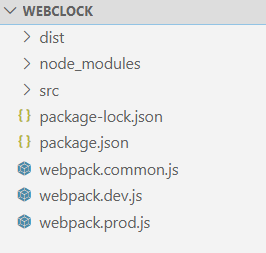
- module.exports = merge(common, … )
-
- “scripts”: {
-
- “build”: “webpack –config webpack.prod.js”,
-
-
- “start-dev”: “webpack-dev-server –config webpack.dev.js”
- }
-
Hal yang sering ditanyakan seputar Panduan Lengkap Webpack untuk Pemula
Apa itu Webpack dan apa fungsinya?
Webpack adalah module bundler untuk aplikasi JavaScript modern. Fungsinya mengobservasi semua module yang digunakan dalam proyek, lalu membungkus modul-modul tersebut menjadi satu berkas statis (static assets) siap pakai di tahap produksi.
Apa perbedaan Webpack dan Browserify?
Keduanya merupakan module bundler, namun berbeda dari sisi konsep dan kemampuan. Keunggulan Webpack dibandingkan Browserify adalah kemampuan memproses berkas selain JavaScript seperti TypeScript dan Sass tanpa memerlukan task runner seperti Grunt atau Gulp.
Apa kelebihan Webpack untuk pengembangan web?
Webpack mampu memproses berbagai jenis modul dan berkas selain JavaScript dalam satu alur kerja terpadu. Pengembang tidak perlu mengandalkan tool tambahan untuk mengelola aset seperti CSS preprocessor atau TypeScript, sehingga alur kerja lebih efisien.
Apakah Webpack hanya bisa memproses JavaScript?
Tidak. Selain JavaScript, Webpack dapat memproses berbagai jenis file seperti TypeScript, Sass, gambar, dan aset lainnya. Fitur ini membedakannya dari bundler lain yang umumnya terbatas pada JavaScript saja.
Memuat komentar…