
-
- index.html
-
- <!DOCTYPE html>
-
- <html>
-
- <head>
-
- <meta charset=“utf-8”>
-
- <meta name=“viewport” content=“width=device-width”>
-
- <title>repl.it</title>
-
- <link href=“style.css” rel=“stylesheet” type=“text/css” />
-
- </head>
-
- <body>
-
- <script src=“script.js” type=“module”></script>
-
- </body>
- </html>
-
- script.js
-
- import “./article-list.js”;
-
- import articles from “./articles.js”;
-
- const articleListElement = document.createElement(“article-list”);
-
- articleListElement.articles = articles;
- document.body.appendChild(articleListElement);
-
- article-list.js
-
- import “./article-item.js”
-
- class ArticleList extends HTMLElement {
-
- set articles(articles) {
-
- this._articles = articles;
-
- this.render();
-
- }
-
- render() {
-
- this._articles.forEach(article => {
-
- const articleItemElement = document.createElement(“article-item”);
-
- // memanggil fungsi setter article() pada article-item.
-
- articleItemElement.article = article;
-
- this.appendChild(articleItemElement);
-
- })
-
- }
-
- }
- customElements.define(“article-list”, ArticleList);
-
- article-item.js
-
- class ArticleItem extends HTMLElement {
-
- set article(article) {
-
- this._article = article;
-
- this.render();
-
- }
-
- render() {
-
- this.innerHTML = `
-
- <img class=”featured-image” src=”${this._article.featuredImage}”>
-
- <div class=”article-info”>
-
- <h2><a href=”${this._article.id}”>${this._article.title}</a></h2>
-
- <p>${this._article.description}</p>
-
- </div>
-
- `;
-
- }
-
- }
- customElements.define(“article-item”, ArticleItem);
-
-
- articles.js
-
-
- {
-
- id: 1,
-
- title: “Lorem Ipsum Dolor”,
-
- featuredImage: “https://i.picsum.photos/id/204/536/354.jpg”,
-
- description: “Lorem Ipsum is simply dummy text of the printing and typesetting industry. Lorem Ipsum has been the industry’s standard dummy text ever since the 1500s, when an unknown printer took a galley of type and scrambled it to make a type specimen book. It has survived not only five centuries, but also the leap into electronic typesetting, remaining essentially unchanged. It was popularised in the 1960s with the release of Letraset sheets containing Lorem Ipsum passages, and more recently with desktop publishing software like Aldus PageMaker including versions of Lorem Ipsum.”
-
- },
-
- {
-
- id: 2,
-
- title: “Lorem Ipsum Dolor”,
-
- featuredImage: “https://i.picsum.photos/id/209/536/354.jpg”,
-
- description: “Lorem Ipsum is simply dummy text of the printing and typesetting industry. Lorem Ipsum has been the industry’s standard dummy text ever since the 1500s, when an unknown printer took a galley of type and scrambled it to make a type specimen book. It has survived not only five centuries, but also the leap into electronic typesetting, remaining essentially unchanged. It was popularised in the 1960s with the release of Letraset sheets containing Lorem Ipsum passages, and more recently with desktop publishing software like Aldus PageMaker including versions of Lorem Ipsum.”
-
- },
-
- {
-
- id: 3,
-
- title: “Lorem Ipsum Dolor”,
-
- featuredImage: “https://i.picsum.photos/id/206/536/354.jpg”,
-
- description: “Lorem Ipsum is simply dummy text of the printing and typesetting industry. Lorem Ipsum has been the industry’s standard dummy text ever since the 1500s, when an unknown printer took a galley of type and scrambled it to make a type specimen book. It has survived not only five centuries, but also the leap into electronic typesetting, remaining essentially unchanged. It was popularised in the 1960s with the release of Letraset sheets containing Lorem Ipsum passages, and more recently with desktop publishing software like Aldus PageMaker including versions of Lorem Ipsum.”
-
- },
-
- {
-
- id: 4,
-
- title: “Lorem Ipsum Dolor”,
-
- featuredImage: “https://i.picsum.photos/id/212/536/354.jpg”,
-
- description: “Lorem Ipsum is simply dummy text of the printing and typesetting industry. Lorem Ipsum has been the industry’s standard dummy text ever since the 1500s, when an unknown printer took a galley of type and scrambled it to make a type specimen book. It has survived not only five centuries, but also the leap into electronic typesetting, remaining essentially unchanged. It was popularised in the 1960s with the release of Letraset sheets containing Lorem Ipsum passages, and more recently with desktop publishing software like Aldus PageMaker including versions of Lorem Ipsum.”
-
- }
-
- ]
- export default articles;
- style.css
-
- * {
-
- padding: 0;
-
- margin: 0;
-
- box–sizing: border–box;
-
- }
-
- body {
-
- padding: 16px;
-
- }
-
- article–daftar {
-
- display: block;
-
- max–width: 800px;
-
- margin: 0 auto;
-
- }
- article–item {
-
- display: block;
-
- margin–bottom: 18px;
-
- box–shadow: 0 4px 8px 0 rgba(0, 0, 0, 0.2);
-
- border–radius: 10px;
-
- overflow: hidden;
-
- }
-
- article–item > .featured–image {
-
- width: 100%;
-
- max–height: 300px;
-
- object–fit: cover;
-
- object–position: center;
-
- }
-
- article–item > .article–info {
-
- padding: 24px;
-
- }
-
- article–item > .article–info > p {
-
- margin–top: 10px;
- }
-
- set articles(articles) {
-
- this._articles = articles;
-
- this.render();
- }
-
- render() {
-
- this._articles.forEach(article => {
-
- const articleItemElement = document.createElement(“article-item”);
-
- // memanggil fungsi setter article() pada article-item.
-
- articleItemElement.article = article;
-
- this.appendChild(articleItemElement);
-
- })
- }
-
- import “./article-list.js”;
-
- import articles from “./articles.js”;
-
- const articleListElement = document.createElement(“article-list”);
-
- articleListElement.articles = articles;
- document.body.appendChild(articleListElement);
Hal yang sering ditanyakan seputar Contoh Nested Custom Element dan Penjelasannya
Apa itu nested custom element dalam web component?
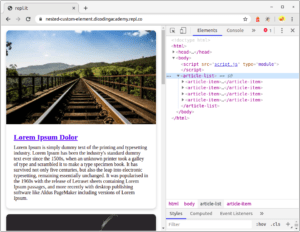
Nested custom element adalah kondisi di mana satu custom element ditempatkan di dalam custom element lain. Contohnya, container “ menampung beberapa elemen “ di dalamnya. Pendekatan ini memungkinkan struktur komponen hierarkis yang lebih terorganisir dan reusable.
Bagaimana cara membuat container custom element yang otomatis membuat child element?
Buat class yang extends `HTMLElement`, lalu dalam constructor atau `connectedCallback` iterasi data array dan panggil `document.createElement()` untuk setiap child element. Append hasilnya ke `this.appendChild()`. Contohnya, “ menerima array data artikel, lalu membuat elemen “ untuk setiap entri secara otomatis.
Apa keuntungan menggunakan nested custom element dibandingkan manual DOM manipulation?
Pertama, komponen menjadi reusable karena container dan item dipisah dalam komponen terpisah. Kedua, pemeliharaan lebih mudah karena perubahan struktur item hanya dilakukan pada satu komponen. Ketiga, kode lebih bersih karena manipulasi DOM berulang untuk item daftar dikapsulasi dalam satu custom element container.
Bagaimana data array diteruskan ke custom element container?
Data array bisa diteruskan melalui JavaScript langsung dengan mengakses property pada instance element, seperti `articleListElement.articles = data`. Alternatif lain menggunakan attribute (untuk data sederhana) atau slot untuk konten statis. Dalam contoh article, array data diimport dari file terpisah (`articles.js`) lalu diassign ke property container.
Apakah nested custom element kompatibel di semua browser modern?
Custom element v1 sudah didukung di Chrome, Firefox, Safari, dan Edge versi terbaru. Nested custom element menggunakan mekanisme yang sama, sehingga kompatibilitasnya tidak berbeda. Untuk browser lama yang belum mendukung Web Components, gunakan polyfill seperti `@webcomponents/custom-elements` agar tetap berjalan.
Memuat komentar…